
Air-Gapped Deployments
Air-gapped deployments sit at the far end of the self-hosted spectrum: the product runs in the customer’s environment with no vendor access and no live path to your SaaS control plane.
Two problems to solve:
- Create a complete offline package (application + every image and dependency).
- Move that package across the gap (USB, exchange/staging server, or another customer-approved transfer), then deploy inside the isolated network.
A Compose file or Helm chart alone is not enough. Images have to travel with the recipe, or be pullable from a place the customer is allowed to reach.
Solution Architecture
Section titled “Solution Architecture”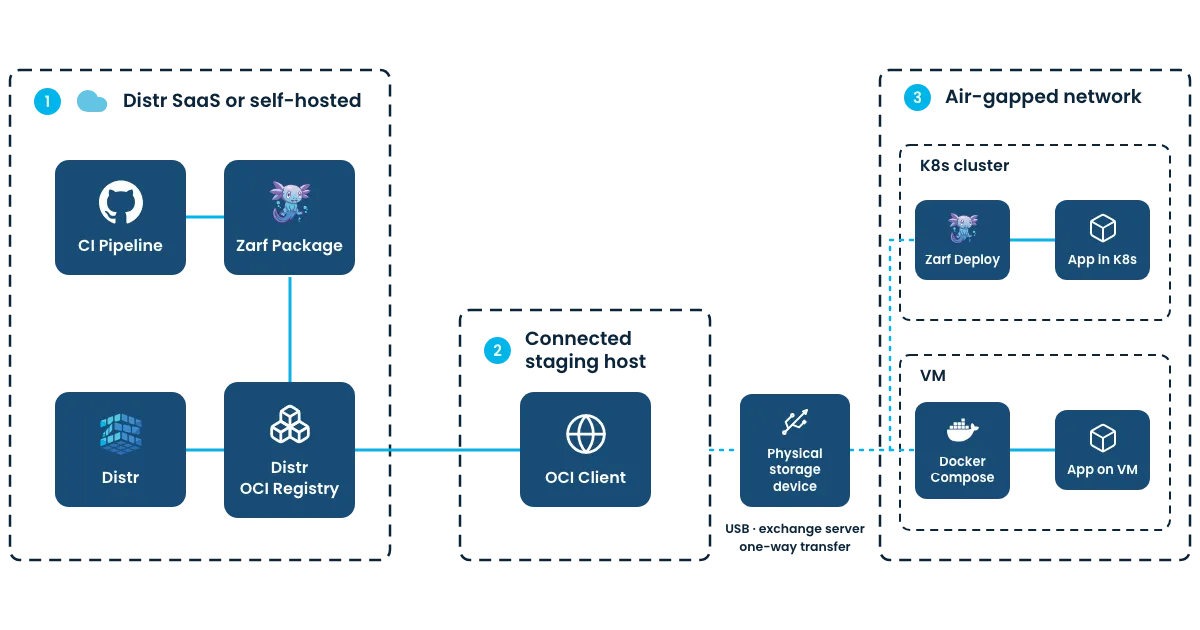
True air-gapped deployments: Kubernetes with Zarf (recommended)
Section titled “True air-gapped deployments: Kubernetes with Zarf (recommended)”For Kubernetes, Zarf is the path we recommend. A Zarf package is the offline bundle: Helm chart, container images, dependencies, and SBOMs in one archive.
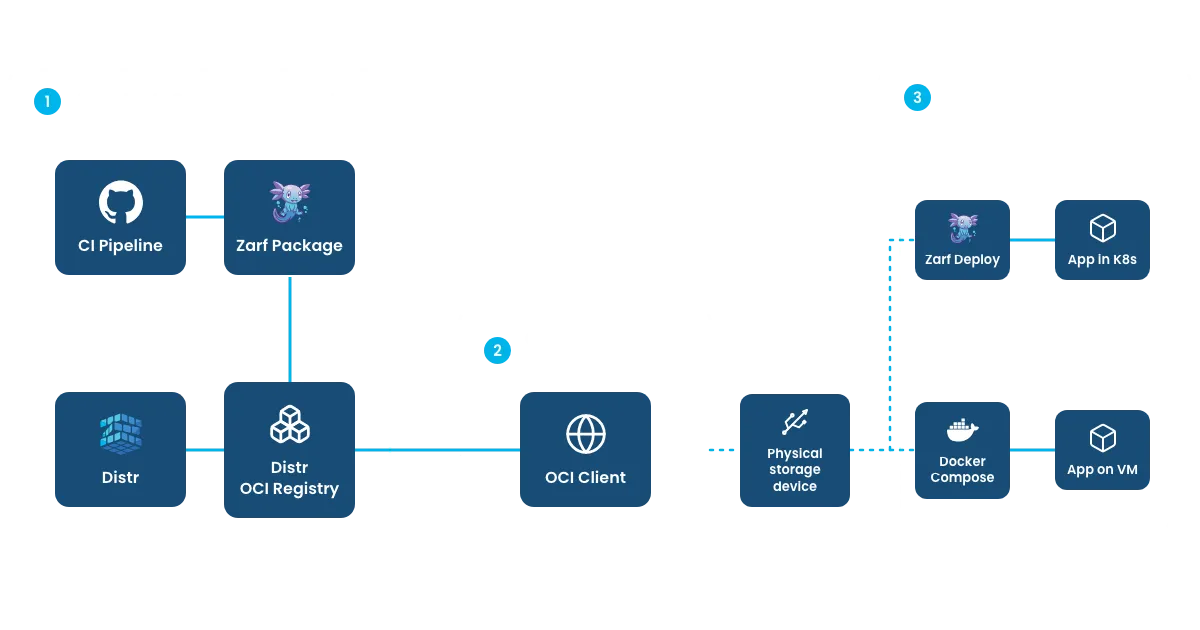
- Create the Zarf package with Distr. Build it in CI (for example the GitHub Actions job in the Zarf integration guide) so every release produces a versioned archive, then publish it to your Distr registry. Control who can pull which versions with artifact entitlements.
- Customer moves it across the gap on a connected staging machine they control: pull the entitled package from Distr, then transfer via USB/removable media, an exchange/DMZ server, or whatever one-way process they already trust.
- Deploy offline inside the air-gapped cluster with
zarf package deployfrom the local archive. No vendor access, no pull from Distr at install time.
Commands, zarf.yaml, and the full GitHub Actions example live in the Zarf integration guide. This use-case page is the model; that page is the how-to.
True air-gapped deployments: Docker Compose
Section titled “True air-gapped deployments: Docker Compose”Same idea as Kubernetes, without a Zarf-style single archive from Distr today: the customer must get the Compose file and every image onto a connected machine, then carry that set across the gap.
Vendor side. Upload to Distr everything the app needs: the Compose file and every image it references (frontend, backend, Redis, Postgres, sidecars, …). Compose alone is not enough. If only Compose is on Distr, the customer would still have to pull images from somewhere else (often Docker Hub). Put all images on Distr, point Compose at those Distr image references, and entitle the customer for those artifacts.
Customer side (true air-gapped deployment).
- On a connected staging host, pull everything they are entitled to from Distr: Compose file + all images.
- Export the images (for example
docker save) into an archive; keep the Compose file and config/license material with it. - Transfer that set across the gap (USB, exchange server, or approved one-way process).
- Inside the isolated network:
docker loadthe images, thendocker compose up. Compose uses theimage:names in the file. Those names must match the tags you loaded (your Distr tags). If the image is already present locally, Compose does not need network access and does not pull. You usually do not rewrite Compose after load, as long as it already referenced Distr image names. (Optional: load into their internal registry and retarget Compose there.)
Crossing the gap
Section titled “Crossing the gap”How the package enters the isolated network is the customer’s process. Common patterns:
- USB / removable media: download on a connected host, carry media in, deploy from local files.
- Exchange / staging server: download to a customer-controlled DMZ or jump host, then move through their approved transfer into the isolated network.
- Data diode / one-way: same idea: content only moves inbound under their controls.
Restricted outbound to Distr (not a true air-gapped deployment)
Section titled “Restricted outbound to Distr (not a true air-gapped deployment)”If the customer allows outbound access only to Distr, the environment is restricted, not air-gapped. They authenticate and pull entitled Compose + images directly from your Distr registry (see the customer portal registry flow), then run Compose there.
That only works when every image: in Compose points at Distr. If Compose still references Docker Hub (or another registry), whitelist Distr is not enough.
Prefer the true air-gapped paths above when there is no outbound path at all. Use restricted pulls when the buyer allows Distr but nothing else.
Customer-hosted Distr
Section titled “Customer-hosted Distr”Some end customers run a self-hosted Distr instance inside their own network so distribution stays inside their boundary. That is a special enablement path. Contact support@distr.sh if you need it.