
Your Helm Chart Works. But Does It Work on Your Customer's Kubernetes?

Kubernetes ships three minor versions a year. Your customers run whatever their platform team approved two years ago. How ISVs stop finding out about the gap from a support ticket.
Kubernetes ships three minor versions a year. Each one deprecates APIs, promotes betas to stable, and occasionally removes things entirely.
You test your Helm chart. It works. You ship it.
Then a customer opens a ticket. Their deployment failed. Turns out they’re on 1.28 and the API version your chart uses was removed in 1.29. Or the opposite: they upgraded to 1.33 and something you relied on being in beta has changed behavior.
You didn’t know what version they were running. They didn’t think to tell you.
The Kubernetes Version Problem for ISVs
When you’re shipping software to on-prem or customer-controlled environments, you don’t control the infrastructure. That’s the whole point. The customer runs it.
But Kubernetes isn’t like Docker, where “use a recent version” is mostly fine advice. Kubernetes has a strict API lifecycle. Beta resources graduate. Deprecated APIs get removed on a schedule. A chart that runs perfectly on 1.30 can fail hard on 1.32 for reasons that have nothing to do with your code. Just a removed API that was already flagged for deprecation two releases ago.
Enterprise customers are notoriously slow to upgrade their clusters. You might be shipping software in 2026 and still have customers on 1.28 or 1.29. Meanwhile you also have early-adopter customers on the latest version demanding you support it.
You end up in a position where you’re implicitly claiming compatibility with a range of Kubernetes versions you’ve never actually tested. And the first signal that something broke is a support ticket.
Automated Kubernetes Version Testing in CI
Every release should ship with a clear, tested answer to: which Kubernetes versions does this version work on?
Not a best guess. Not “we tested on 1.31 and assume the rest is fine.” An actual automated check, run against every version you claim to support, in CI, on every release.
The approach is schema validation: validate your Helm chart’s rendered output against the Kubernetes OpenAPI schema for each target version. kubeconform does this without spinning up actual clusters. It runs in seconds on a CI runner. You get a pass/fail for every Kubernetes version, every release.
That output is your compatibility matrix.
Surfacing the Compatibility Matrix in the Customer Portal
Running the validation is one thing. Getting the results to the right people is another.
Most ISVs don’t have a good answer for this. The compatibility matrix lives in your CI logs, maybe in an internal wiki if someone remembered to update it. Customers have to ask. You have to dig it out and email it. Sometimes it’s out of date by the time you find it.
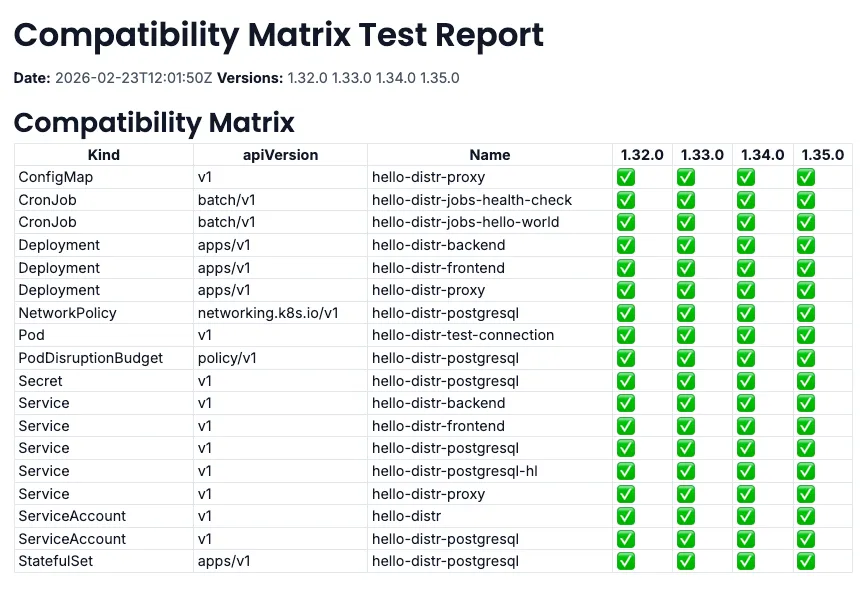
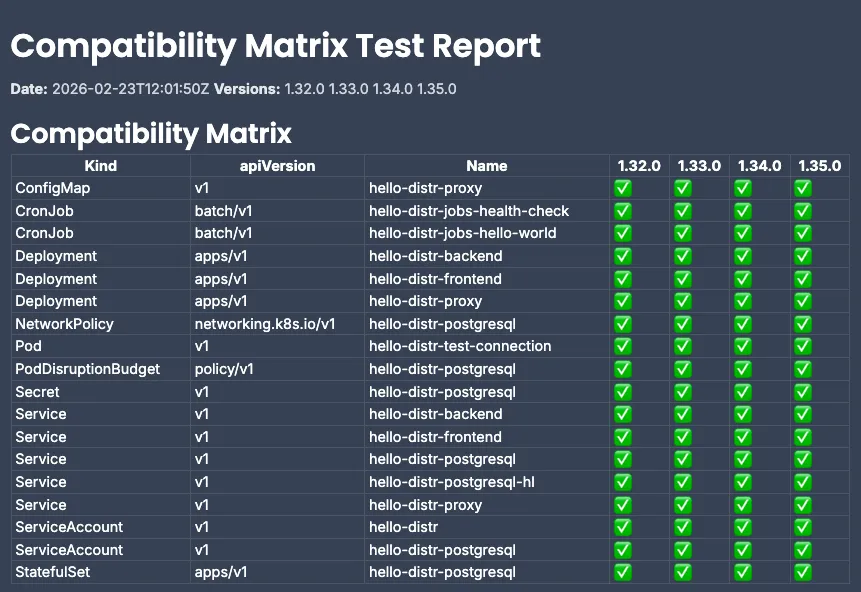
In Distr, the compatibility report gets attached directly to the application version as a version resource, visible to customers in their portal alongside the version details. They can check compatibility for their specific cluster version before they approve an upgrade. No emails. No back-and-forth.
The visibleToCustomers flag means you can also attach internal notes to the same version: things you want your support team to see but don’t need to expose to customers. You control what they see.
What a Compatibility-Aware Upgrade Looks Like
A customer on Kubernetes 1.29 is considering upgrading your application. They log into their Distr portal, look at the new version, and see a compatibility matrix right there. Green for 1.28, 1.29, 1.30, 1.31. Red for 1.32 and above, with a note that a specific API was removed.
They upgrade confidently. Or they know not to, and they tell you before it becomes a support issue.
Your support team stops fielding “it failed on upgrade” tickets that were actually compatibility issues that could have been caught before the deployment was ever attempted.
Getting Started with the Kubernetes Compatibility Matrix
The full setup is in the Kubernetes Compatibility Matrix guide. The hello-distr repository has a complete working example with all the scripts and a GitHub Actions workflow you can adapt.
If you’re already using Distr with the automatic deployments from GitHub workflow, this is a straightforward extension: three additional jobs in the same pipeline.
If you’re not using Distr yet and you’re distributing Helm-based software to customer Kubernetes environments… this is exactly the kind of problem we’re built around. Try it out.
Join the Conversation
Using this already, or have questions about the setup?


