
Docker Controller Security
The Docker controller manages Docker on the host, so it has the access of the Docker engine itself.
Architecture
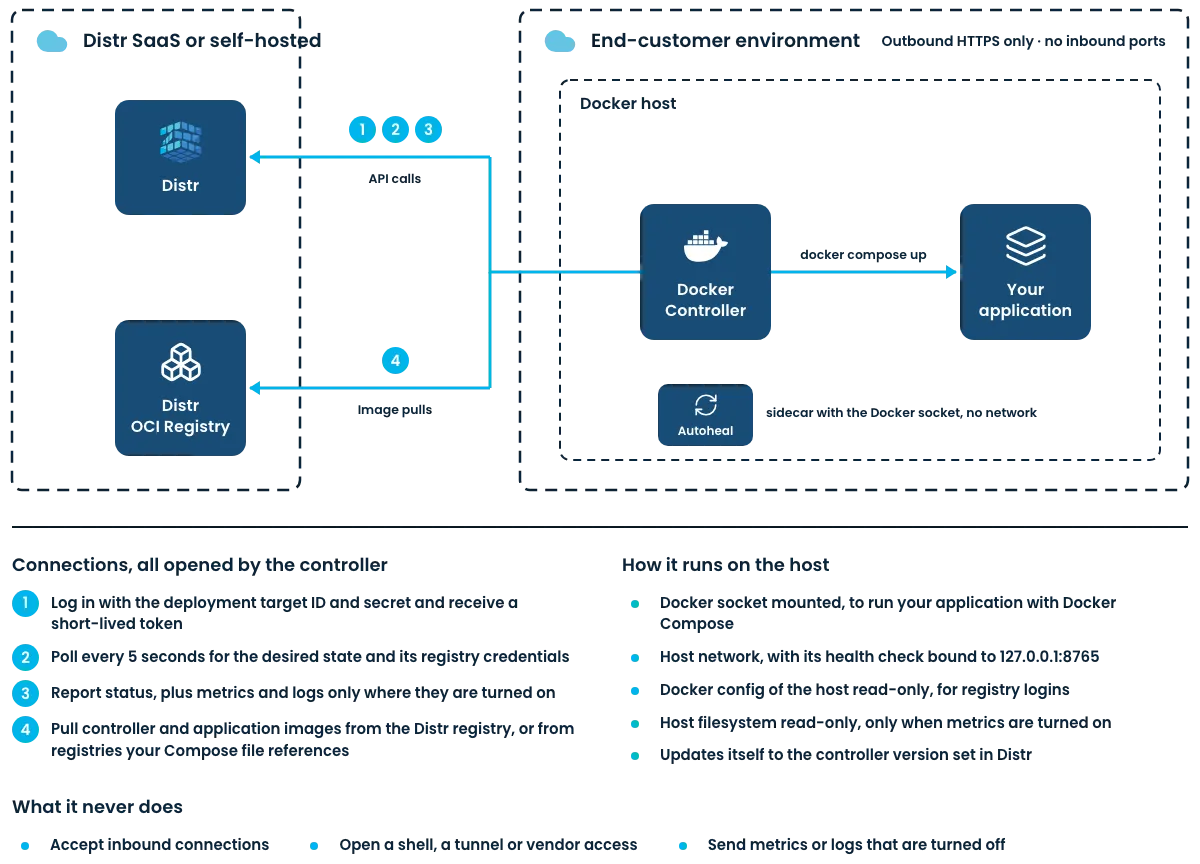
Section titled “Architecture”The controller opens every connection to Distr itself, over HTTPS, so the host needs no inbound ports.
Access to the Host
Section titled “Access to the Host”The Compose file that installs the controller runs two containers as root, the controller and the autoheal service. Autoheal only mounts the Docker socket, the controller mounts:
| Mount (default) | Purpose | Optional | Changed by |
|---|---|---|---|
/var/run/docker.sock | Manage containers through the Docker API | No | Deployment target editor, as a custom Docker endpoint |
${HOME}/.docker, read-only | Reuse the host’s registry credentials, see Authentication with OCI Registries | No | Host administrator, with HOST_DOCKER_CONFIG_DIR |
/ as /hostfs, read-only | Read the mount table and the size of container log files for metrics | Yes, on by default in the UI | Deployment target editor, with Report Metrics |
scratch volume | Keep the Compose and env files of the deployments and the files of self-updates | No | Not configurable |
A deployment target editor is a user with the read_write or admin role in the vendor organization or in the customer organization the deployment target belongs to. The API only enables metrics when a request sets metricsEnabled.
The controller runs in the host’s network namespace. The autoheal container has no network and only talks to the Docker socket.
Distr renders the Compose file when the controller connects and again for every self-update. A change to the deployment target, such as enabling metrics, reaches the host with the next controller update, and local edits to the Compose file are overwritten then.
Docker Operations
Section titled “Docker Operations”The controller talks to the Docker engine only through the mounted socket. It runs Compose operations through the Compose library built into the controller, and the self-update through the Docker CLI of the controller image. The commands below are what the controller runs, written as the equivalent Docker CLI calls, with these placeholders:
| Placeholder | Value |
|---|---|
<project> | The Compose project of the deployment, distr- followed by the first 8 characters of its ID |
<dir> | The project directory of the deployment, /scratch/projects/<deployment-id> in the scratch volume |
<docker-config> | The registry credentials of the deployment, /tmp/<deployment-id>/docker in the controller container |
Distr sets <project> as the name of the Compose file it sends. The controller writes that file to <dir>/docker-compose.yaml and, when the deployment has an env file, that file to <dir>/.env. Both are readable by root only. A deployment without an env file has no .env: the controller deletes one left by an earlier revision, because Compose reads a .env in the project directory on its own.
Applying a Deployment
Section titled “Applying a Deployment”The controller applies a deployment when Distr sends a revision it has not applied yet, and again on every cycle while the last apply failed or did not finish. A running deployment is not applied again.
First it logs in to the Distr registry with its current login token and to the registries of the deployment’s application entitlements with their credentials, the equivalent of docker login. It stores these credentials in <docker-config> and uses that directory instead of the host’s Docker config for every command of the deployment that needs one of these logins.
It then runs:
docker compose --project-directory <dir> --file <dir>/docker-compose.yaml \ up --detach --remove-orphans --no-buildThis creates the networks and volumes of the project, pulls the images that are missing or whose pull_policy asks for it, creates and starts the containers, runs their post_start hooks and removes the containers of services the project no longer defines. Images are never built on the host. An apply that has not finished after 10 minutes is canceled and reported as an error.
Restarting a Deployment
Section titled “Restarting a Deployment”When a revision is created with Force restart, the controller restarts the deployment after a successful apply:
docker compose --project-directory <dir> --file <dir>/docker-compose.yaml restartCleaning Up Images
Section titled “Cleaning Up Images”With image cleanup enabled, the controller collects the images of all containers of the previous revision with docker compose --project-name <project> ps --all before an apply and, once the apply succeeded, removes each of them:
docker image rm <image>It does not force the removal, so an image the new revision or another container still uses stays on the host.
Undeploying a Deployment
Section titled “Undeploying a Deployment”When a deployment is no longer part of the deployment target, the controller removes it:
docker compose --project-directory <dir> --file <dir>/docker-compose.yaml down --volumes --remove-orphansdocker compose --project-name <project> down --volumes --remove-orphansdocker image rm <image>The first down loads the project so that Compose runs the pre_stop hooks of its services. The second one removes whatever is left with the label of the project, including volumes and networks a previous revision declared. The images are those of the deployment’s containers and are removed whether or not image cleanup is enabled. Finally the controller deletes <dir>.
Updating the Controller
Section titled “Updating the Controller”When the controller version of the deployment target changes, the controller fetches its new Compose file from Distr, adds its target secret to it and writes it to /scratch/distr-update.yaml. It removes a stopped container named distr-controller-update left over from an earlier update, and then starts the update from a container of the new image:
docker run --detach --rm --name distr-controller-update \ --entrypoint /usr/local/bin/docker-entrypoint.sh \ --env HOST_DOCKER_CONFIG_DIR=<host-docker-config-dir> \ --env DOCKER_HOST=unix:///var/run/docker.sock \ --volumes-from <controller-container-id> \ <controller-image>:<new-version> \ docker compose -f /scratch/distr-update.yaml up -d--volumes-from gives the update container the mounts of the controller, including the Docker socket. The update recreates the controller and autoheal containers of the distr project and removes itself when it is done.
Reading State, Logs and Metrics
Section titled “Reading State, Logs and Metrics”These calls only read. They run for the applied revision of every deployment:
| Interval | Command |
|---|---|
Every DISTR_CONTROLLER_INTERVAL | docker compose --project-name <project> ps --all for the status |
| Every 30 seconds, with log collection | docker compose --project-name <project> logs --timestamps --since <last-collected> |
| Every 30 seconds, with metrics | docker compose --project-name <project> ps, then docker stats --no-stream and docker inspect per container |
With metrics enabled the controller also reads the usage of its own containers through docker ps --filter label=com.docker.compose.project=distr, docker stats --no-stream and docker inspect, and the size of the image store through the equivalent of docker system df every 5 minutes. It reads the CPU and memory usage of the host from /proc, the mounted devices from /hostfs/proc/mounts, the usage of each mounted /dev/ device and the size of the container log files that docker inspect names under /hostfs.
Autoheal
Section titled “Autoheal”The autoheal container checks every 5 seconds for unhealthy containers and restarts them, through the Docker API, as the equivalent of:
docker ps --filter health=unhealthy --filter status=running --filter label=sh.distr.autoheal=truedocker restart --time 10 <container>It skips containers labeled autoheal=False and takes the timeout from a container’s autoheal.stop.timeout label where one is set. With autoheal enabled for all containers, the label filter is left out, so it restarts every unhealthy container on the host. See Autoheal.
Anything else that runs comes from the Compose file of a deployment, such as its lifecycle hooks.
Credentials on the Host
Section titled “Credentials on the Host”- The target secret is part of the controller’s environment, so anyone who can inspect the controller container can read it. During a self-update it is also written to
/scratch/distr-update.yaml. Authentication explains how to replace it. - The env files of the deployments, with their secrets filled in, are kept in
<dir>/.envin thescratchvolume, readable by root only. - The registry credentials of every deployment, including the controller’s login token for the Distr registry, are kept in
<docker-config>/config.jsonin the temporary directory of the controller container.