
Vulnerability Scanning
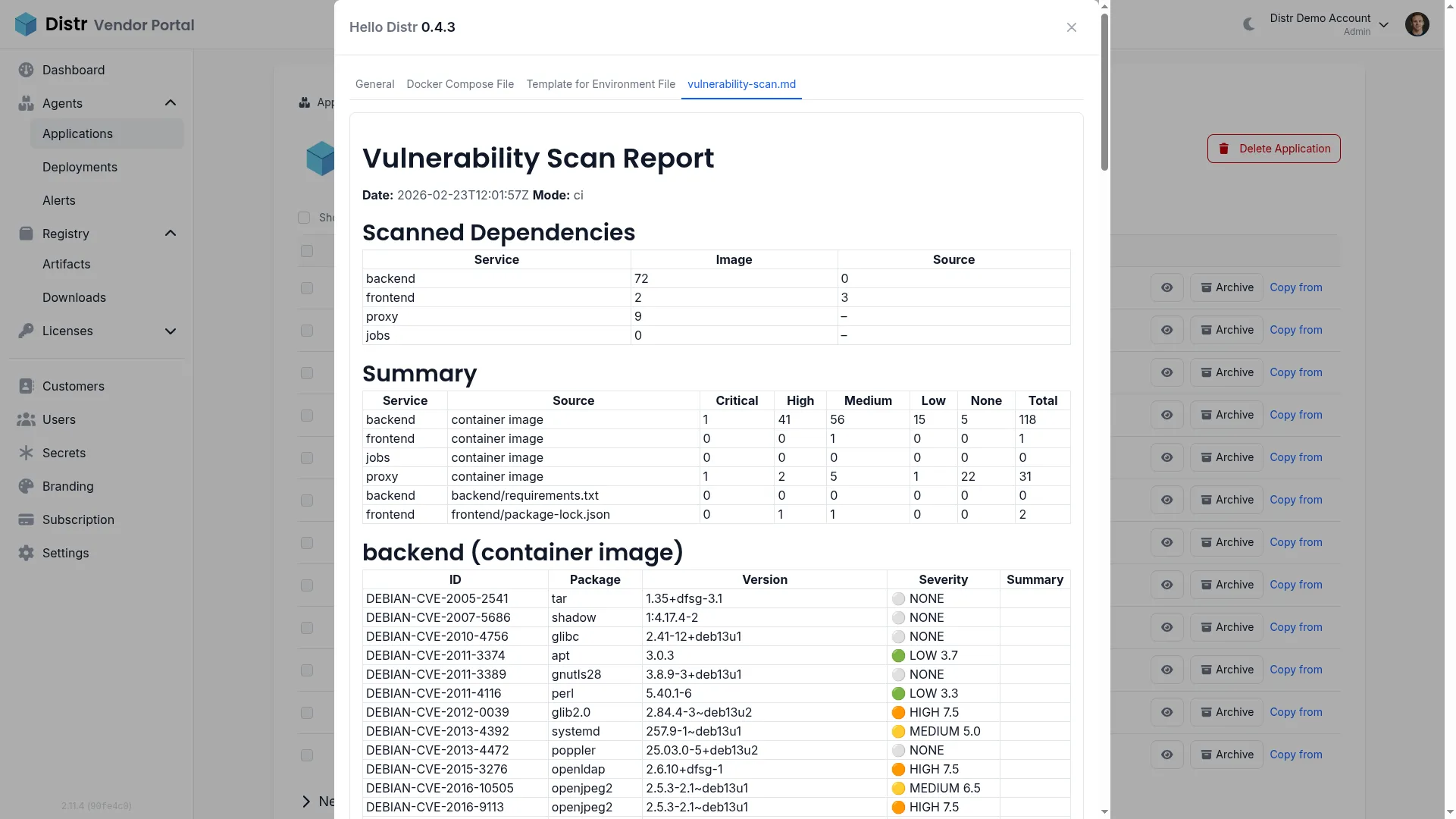
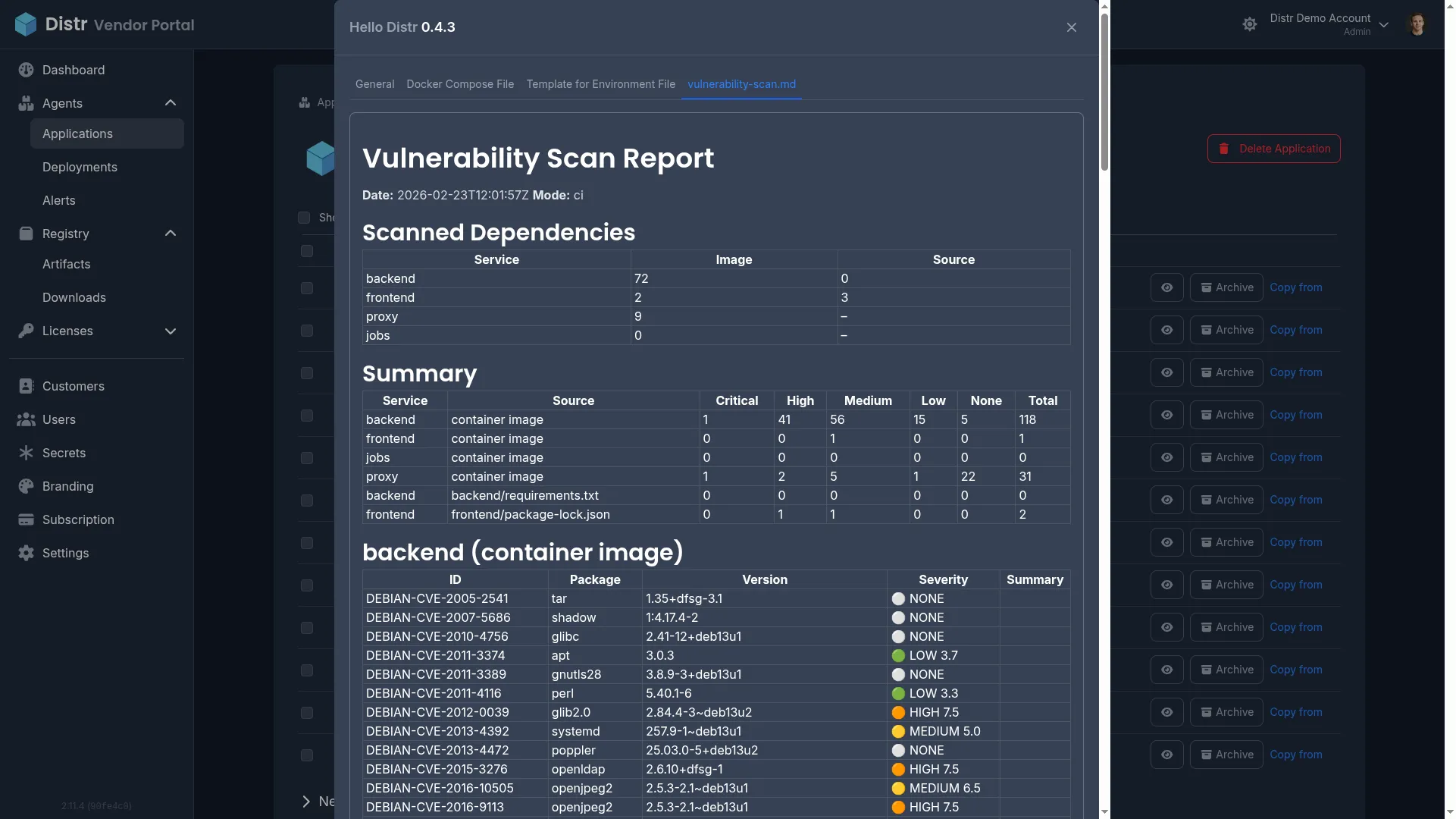
When you distribute software to enterprise customers, shipping versions with known vulnerabilities erodes trust, slows adoption during security reviews, and creates a reactive support burden. Customers increasingly expect transparency about the security posture of the software they deploy — and the first time they discover a known CVE in your application shouldn’t be during their own security audit.
Automated vulnerability scanning solves this by adding a scanning stage to your CI/CD pipeline that checks both source dependencies (lockfiles) and container images on every release. The results are compiled into a severity-classified report and attached as a customer-visible version resource in Distr.
The benefits compound as your customer base grows:
- Catch vulnerabilities before customers do. Automated scanning on every release flags known CVEs in your dependencies and container images before they reach customer environments.
- Reduce security review friction. When every version ships with a vulnerability report, customer security teams can review findings upfront rather than running their own scans and raising tickets.
- Build customer confidence with transparency. Sharing a vulnerability report alongside each version demonstrates proactive security practices — no back-and-forth, no surprises.
- Cover both source dependencies and container images. Scanning lockfiles catches dependency-level vulnerabilities while image scanning catches issues in base images and system packages.
- Non-blocking by default — informational, not a gate. The scan always exits with code 0. Vulnerabilities are reported, not enforced, giving you flexibility to ship while tracking known issues.
In this guide, you’ll set up an automated vulnerability scanning pipeline that checks your application’s dependencies and container images on every build and publishes the results as a version resource in Distr — visible to your customers in their portal.
By the end of this guide, you’ll have:
- A GitHub Actions workflow that scans lockfiles and container images on every build
- A unified vulnerability report with per-service breakdowns classified by CVSS severity
- Automated attachment of the vulnerability report as a version resource visible to customers in Distr
Prerequisites for Vulnerability Scanning
Section titled “Prerequisites for Vulnerability Scanning”Before starting, ensure you have:
- A Distr account with an organization set up
- A Docker or Helm application configured in Distr (see Create Application)
- A GitHub repository containing your application
- The Automatic Deployments from GitHub workflow already configured — this guide extends that pipeline with a vulnerability scanning stage
- Container images published to a registry accessible from your CI runner (e.g., GHCR, Docker Hub)
How Distr Vulnerability Scanning Works in CI/CD
Section titled “How Distr Vulnerability Scanning Works in CI/CD”The vulnerability scan runs as part of your CI/CD pipeline and attaches a report as a version resource to your Distr application version. The hello-distr workflow provides a complete working example you can use as a starting point.
The workflow defines three core jobs with the following dependency chain:
- build — Builds and pushes container images for each service to your container registry.
- vulnerability-scan — Runs the scan script against source dependency lockfiles and container images. Uploads the report as a workflow artifact and writes it to the GitHub Actions job summary.
- distr-docker / distr-kubernetes — Downloads the vulnerability scan artifact and attaches
vulnerability-scan.mdas a customer-visible version resource alongside the version creation using distr-create-version-action.
These jobs are ordered via dependencies so they run in this sequence relative to each other, while still allowing any non-dependent jobs in your workflow to run in parallel where applicable. The scan covers two dimensions:
- Source dependencies: The scanner reads lockfiles (
requirements.txt,package-lock.json, etc.) and checks each dependency against public vulnerability databases for known issues. - Container images: The scanner analyzes image layers to identify vulnerable packages in base images and system-level dependencies.
Results are classified using CVSS scores into severity levels: Critical (9.0+), High (7.0+), Medium (4.0+), Low (0.1+), and None (0.0 or unscored). Output is generated in both Markdown (vulnerability-scan.md) for human review and JSON (vulnerability-scan.json) for programmatic processing.
Understanding Version Resources in Distr
Section titled “Understanding Version Resources in Distr”Version resources are supplementary markdown content items attached to application versions. They appear alongside the version details in both the vendor and customer portals.
The visibleToCustomers flag controls visibility:
- When
true, the resource appears in the customer portal — useful for vulnerability reports, compatibility matrices, and release notes - When
false, the resource is only visible to vendor team members — useful for internal notes and deployment checklists
For a detailed explanation of version resources including programmatic creation via the Distr SDK, see Understanding Version Resources in the Kubernetes Compatibility Matrix guide.
Example Vulnerability Scanning Pipeline from hello-distr
Section titled “Example Vulnerability Scanning Pipeline from hello-distr”The hello-distr repository provides a complete working example of this setup.
File layout:
hello-distr/ .github/workflows/ hello-distr.yaml # Workflow with vulnerability-scan job deploy/ scripts/ distr-vulnerability-scan.sh # Vulnerability scanning script backend/ requirements.txt # Python dependencies (pinned versions) frontend/ package-lock.json # Node.js dependencies mise.toml # Tool versions including scannerThe hello-distr implementation:
- Scans 4 services: backend, frontend, proxy, and jobs
- Scans lockfiles for services that have them (
requirements.txtfor Python,package-lock.jsonfor Node.js) - Scans container images for all 4 services
- Classifies vulnerabilities by CVSS severity with color-coded indicators
- Writes the report to the GitHub Actions job summary for easy review
- Merges per-scan JSON results into a unified
vulnerability-scan.json - Always exits with code 0 — vulnerabilities are informational and do not block the pipeline
- Supports two execution modes:
ci <VERSION>for tag builds (scans registry images) and local mode for development (scans locally built images)
You can fork or copy from the hello-distr repository to get started quickly, then customize the scan script for your own services and lockfile paths.
Running Vulnerability Scans Locally
Section titled “Running Vulnerability Scans Locally”You can run the same vulnerability scan locally during development. If you use mise for tool management, the scan script’s dependencies are already declared in mise.toml:
mise installThen execute the scan from the repository root:
# Local mode — scans lockfiles and locally built images tagged :local./deploy/scripts/distr-vulnerability-scan.sh
# CI mode — scans lockfiles and pulls images from the registry for a specific version./deploy/scripts/distr-vulnerability-scan.sh ci 0.3.0
The script generates vulnerability-scan.md and vulnerability-scan.json in the current directory.
Troubleshooting Vulnerability Scanning
Section titled “Troubleshooting Vulnerability Scanning”Scanner Not Found During Vulnerability Scanning
Section titled “Scanner Not Found During Vulnerability Scanning”Problem: The workflow or local scan fails because the scanner binary is not available on the PATH.
Solution: In CI, ensure the install step downloads the correct binary for your runner’s architecture and adds it to $GITHUB_PATH. Locally, run mise install to install all declared tool dependencies.
Container Image Not Found During Vulnerability Scanning
Section titled “Container Image Not Found During Vulnerability Scanning”Problem: The scan script skips image scanning with “image not found” for one or more services.
Solution: In local mode, build the images first with docker build -t <registry>/<service>:local ./<service>. In CI mode, ensure the docker/login-action step runs before the scan and that the image tags match the version being scanned. Verify the container registry URL in the scan script matches your actual registry.
Vulnerability Scan Report Shows No Findings for Container Images
Section titled “Vulnerability Scan Report Shows No Findings for Container Images”Problem: The report lists vulnerabilities from lockfiles but shows zero findings for container images.
Solution: Verify that images are available to the scanner. In local mode, images must be built and present in the local Docker daemon. In CI mode, images must be pushed to the registry and the runner must be authenticated to pull them. Check the workflow logs for “SKIP: image not found” messages.
Vulnerability Scanning Takes Too Long in CI
Section titled “Vulnerability Scanning Takes Too Long in CI”Problem: The vulnerability-scan job significantly increases overall pipeline duration.
Solution: Container image scanning is inherently slower than lockfile scanning because the scanner must pull and analyze image layers. Consider scanning only critical services or using smaller base images. Since the scan job runs in parallel with non-dependent jobs, it typically does not add to the critical path.
Vulnerability Scan Version Resource Not Visible in the Customer Portal
Section titled “Vulnerability Scan Version Resource Not Visible in the Customer Portal”Problem: The vulnerability report was attached but customers cannot see it.
Solution: Verify that visibleToCustomers is set to true in the resources JSON. Check the workflow logs to confirm the artifact was downloaded successfully and the file path in the resources input is correct.
Next Steps After Setting Up Vulnerability Scanning
Section titled “Next Steps After Setting Up Vulnerability Scanning”- Kubernetes Compatibility Matrix — Validate Helm charts against multiple Kubernetes versions and share compatibility reports with customers
- Automatic Deployments from GitHub — If you haven’t already, set up automatic version creation and deployment updates
- Application Licenses — Control which customers can access specific application versions and their vulnerability reports
- Distr SDK — Build custom automation for generating and attaching vulnerability reports programmatically
Additional Resources for Vulnerability Scanning
Section titled “Additional Resources for Vulnerability Scanning”- hello-distr Example Application — Complete working example with vulnerability scanning scripts and workflow
- distr-create-version-action GitHub Repository — GitHub Action documentation including the resources input
- osv-scanner — The open-source vulnerability scanner used under the hood
- CVSS Specification — Common Vulnerability Scoring System documentation
- Distr Discord Community
Have questions? Join our Discord community or check out the FAQs.