
Kubernetes Compatibility Matrix
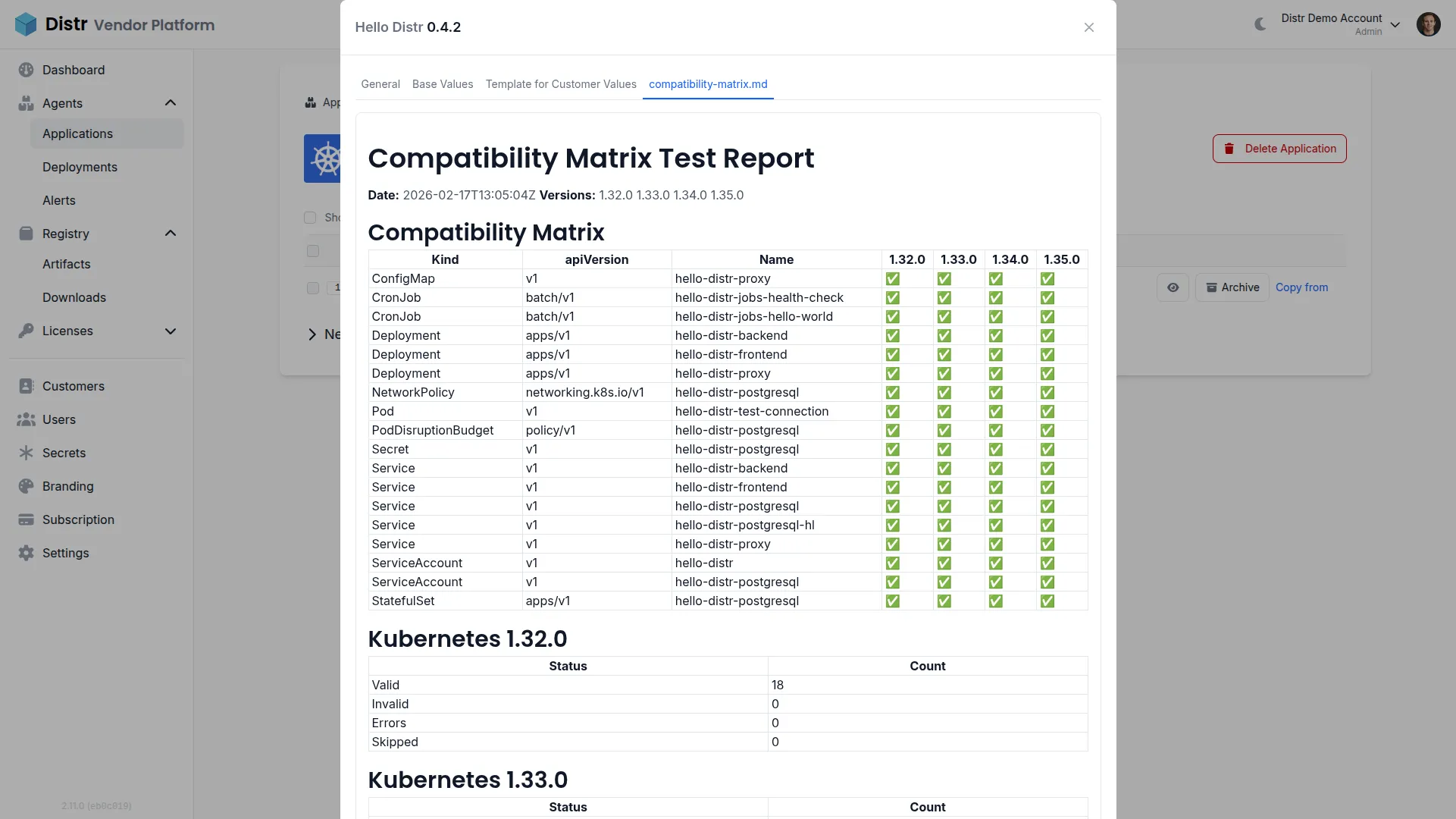
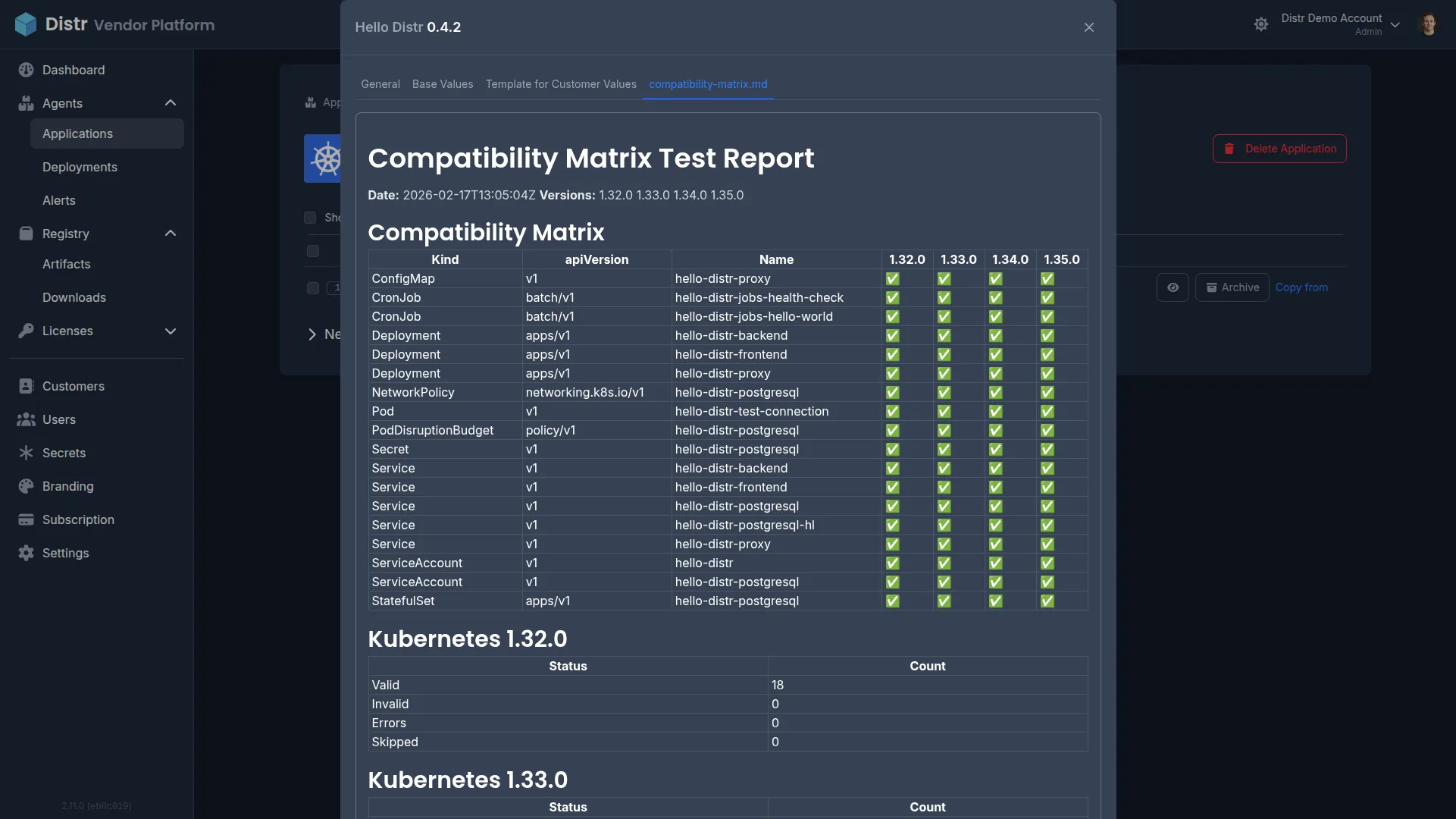
When you distribute a Kubernetes application to enterprise customers, you rarely control which Kubernetes version they run. A single cluster fleet can span three or four minor versions at once, and every Kubernetes release deprecates or removes APIs. A Helm chart that installs cleanly on 1.33 might fail on 1.35 because a beta API it relies on has graduated or been removed — and the first person to discover that is usually a customer filing a support ticket.
A compatibility matrix solves this by systematically validating your Helm chart against every Kubernetes version you claim to support, on every release, as part of your CI/CD pipeline. Instead of manually maintaining test clusters or relying on customer reports, you get an automated, versioned record of exactly which Kubernetes versions your application is compatible with.
The benefits compound as your customer base grows:
- Catch breaking changes before customers do. Kubernetes deprecates and removes APIs on a predictable schedule. Automated validation flags issues the moment they appear in your chart, not after a customer upgrade fails.
- Reduce support burden. When every release ships with a tested compatibility matrix, your support team can immediately confirm whether a reported issue is a known incompatibility or something else entirely.
- Build customer confidence. Sharing a compatibility report alongside each version lets customers verify support for their environment before upgrading — no guesswork, no back-and-forth.
- Eliminate dedicated test infrastructure. Schema-based validation against Kubernetes OpenAPI specs runs in seconds on a CI runner. There are no clusters to provision, no cloud bills to manage, and no teardown to worry about.
- Scale across versions effortlessly. Adding a new Kubernetes version to your matrix is a one-line change. GitHub Actions runs them all in parallel, so validation time stays constant regardless of how many versions you test.
In this guide, you’ll set up a complete compatibility testing pipeline that validates your Helm chart across multiple Kubernetes versions and publishes the results as a version resource in Distr — visible to your customers in their portal.
By the end of this guide, you’ll have:
- A GitHub Actions workflow that validates your Helm chart across multiple Kubernetes versions in parallel
- A unified compatibility matrix report generated from the per-version validation results
- Automated attachment of the compatibility report as a version resource visible to customers in Distr
Prerequisites for Kubernetes Compatibility Testing
Section titled “Prerequisites for Kubernetes Compatibility Testing”Before starting, ensure you have:
- A Distr account with an organization set up
- A Helm application configured in Distr (see Create Application)
- A GitHub repository containing your Helm chart
- The Automatic Deployments from GitHub workflow already configured — this guide extends that pipeline with a compatibility validation stage
- Familiarity with GitHub Actions matrix strategies
How It Works
Section titled “How It Works”The compatibility matrix is generated as part of your CI/CD pipeline and attached as a version resource to your Distr application version. The hello-distr workflow provides a complete working example you can use as a starting point for your own setup.
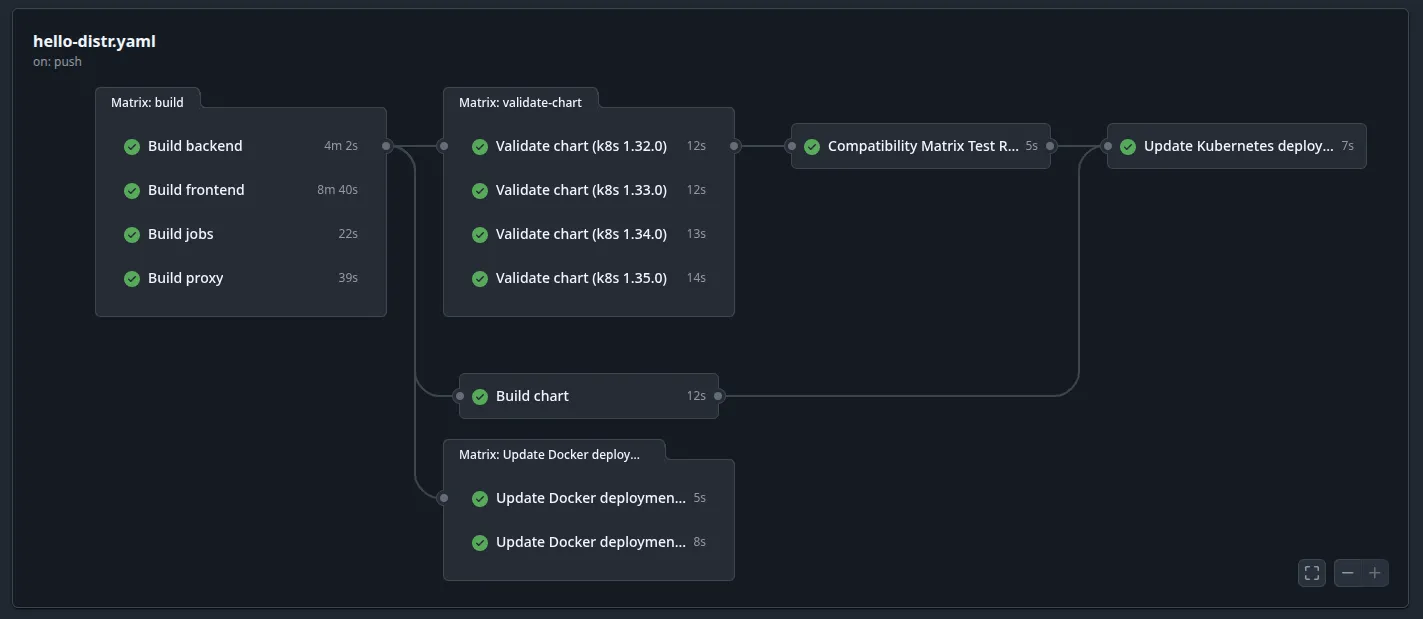
The workflow consists of three jobs that run in sequence:
- validate-chart — Uses a GitHub Actions matrix strategy to validate the Helm chart against each Kubernetes version in parallel using kubeconform. Each matrix job uploads per-version markdown and JSON artifacts.
- compatibility-matrix-report — Downloads all per-version artifacts and merges them into a single unified compatibility matrix report.
- distr-kubernetes — Creates the Distr application version using the distr-create-version-action and attaches the compatibility report as a customer-visible version resource.
Understanding Version Resources in Distr
Section titled “Understanding Version Resources in Distr”Version resources are supplementary markdown content items attached to application versions. They appear alongside the version details in both the vendor and customer portals.
The visibleToCustomers flag controls visibility:
- When
true, the resource appears in the customer portal — useful for compatibility matrices, release notes, and getting-started guides - When
false, the resource is only visible to vendor team members — useful for internal notes, known issues, or deployment checklists
For teams that need to create versions programmatically outside of GitHub Actions, the Distr SDK supports version resources directly:
import {DistrService} from '@distr-sh/distr-sdk';
const distr = new DistrService({  apiKey: process.env.DISTR_API_TOKEN,});
await distr.createKubernetesApplicationVersion(appId, '1.5.0', {  chartType: 'oci',  chartUrl: 'oci://ghcr.io/yourorg/your-chart',  chartVersion: '1.5.0',  resources: [    {      name: 'Kubernetes Compatibility Matrix',      content: compatibilityMatrixMarkdown,      visibleToCustomers: true,    },    {      name: 'Internal Release Notes',      content: '# Internal Notes\n\nThis version includes...',      visibleToCustomers: false,    },  ],});
See the Distr SDK documentation for more details.
Example Kubernetes Compatibility Pipeline from hello-distr
Section titled “Example Kubernetes Compatibility Pipeline from hello-distr”The hello-distr repository provides a complete working example of this setup.
File layout:
hello-distr/ .github/workflows/ hello-distr.yaml # Workflow with validate-chart + report jobs deploy/ charts/hello-distr/ # The Helm chart scripts/ distr-compatibility-matrix.sh # Per-version validation distr-compatibility-matrix-merge-reports.sh # Report merging distr-compatibility-matrix-selftest.sh # kubeconform self-testsThe hello-distr implementation:
- Tests against Kubernetes 1.32.0, 1.33.0, 1.34.0, and 1.35.0
- Uses
fail-fast: falseso all versions are always tested - Writes per-version reports to the GitHub Actions job summary for easy review
- Merges results into a unified
compatibility-matrix.md - Includes a self-test script that verifies kubeconform correctly detects version-specific resources (e.g., the
Workloadkind introduced in Kubernetes 1.35)
You can fork or copy from the hello-distr repository to get started quickly, then customize the scripts and workflow for your own chart.
Troubleshooting Kubernetes Compatibility Validation
Section titled “Troubleshooting Kubernetes Compatibility Validation”Helm Template Rendering Fails for Specific Kubernetes Versions
Section titled “Helm Template Rendering Fails for Specific Kubernetes Versions”Problem: helm template fails with errors about unknown API versions when targeting newer or older Kubernetes versions.
Solution: Check that your chart’s apiVersion fields are compatible with the target versions. Use Capabilities.KubeVersion in your Helm templates to conditionally select API versions. Ensure the kubeVersion constraint in Chart.yaml covers your target range.
kubeconform Reports Missing Schemas for Custom Resources
Section titled “kubeconform Reports Missing Schemas for Custom Resources”Problem: Validation fails with “no schema found” for CRDs.
Solution: Use the -skip flag to exclude CRD kinds, or provide custom schemas via the -schema-location flag. The CRDs-catalog schema location included in the scripts covers many popular CRDs. For custom CRDs, you can host your own schema files and add another -schema-location entry.
Artifact Upload Fails in Kubernetes Version Matrix Jobs
Section titled “Artifact Upload Fails in Kubernetes Version Matrix Jobs”Problem: The actions/upload-artifact step fails with conflicts when multiple matrix jobs write to the same artifact name.
Solution: Ensure each matrix job uses a unique artifact name that includes the Kubernetes version: name: compatibility-matrix-${{ matrix.kubernetes-version }}. Use merge-multiple: true in the download step.
Compatibility Matrix Report Shows Unexpected Validation Failures
Section titled “Compatibility Matrix Report Shows Unexpected Validation Failures”Problem: Resources that should pass are showing as failed in the matrix.
Solution: Verify that kubeconform has the correct schema version. Strict mode (-strict) will fail on unknown fields — consider removing it for charts that include non-standard annotations. Check the detailed per-version reports in the GitHub Actions artifacts for specific error messages.
Version Resource Not Visible in the Customer Portal
Section titled “Version Resource Not Visible in the Customer Portal”Problem: The compatibility report was attached but customers cannot see it.
Solution: Verify that visibleToCustomers is set to true in the resources JSON. Check the workflow logs to confirm the resource was included in the version creation request.
Next Steps After Setting Up Kubernetes Compatibility Testing
Section titled “Next Steps After Setting Up Kubernetes Compatibility Testing”- Automatic Deployments from GitHub — If you haven’t already, set up automatic version creation and deployment updates
- Application Licenses — Control which customers can access specific application versions and their compatibility reports
- Configuring Helm Charts for Distr — Set up authenticated image pulls with imagePullSecrets
- Distr SDK — Build custom automation for generating and attaching compatibility reports programmatically
Additional Resources for Kubernetes Compatibility Testing
Section titled “Additional Resources for Kubernetes Compatibility Testing”- hello-distr Example Application — Complete working example with compatibility matrix scripts and workflow
- distr-create-version-action GitHub Repository — GitHub Action documentation including the resources input
- kubeconform — Kubernetes manifest validation tool
- CRDs-catalog — Community-maintained catalog of CRD schemas for kubeconform
- Kubernetes Version Skew Policy — Official Kubernetes version support policy
- GitHub Actions Matrix Strategy — Matrix build documentation
- Distr Discord Community
Have questions? Join our Discord community or check out the FAQs.